Download your entries as a spreadsheet
Download every entry as a CSV file that opens in Excel or Google Sheets, or everything as JSON for your own backup.
Your household's records belong to you. Take a copy whenever you like.
Download your entries (CSV)
- 1Open Settings → Your data.
- 2Tap Download entries (CSV).
- 3The file is saved to your phone or computer, named with today's date.
It opens in Excel or Google Sheets. Each row is one entry, with the columns date, kind, category, amount, currency, account, merchant, note and essential.
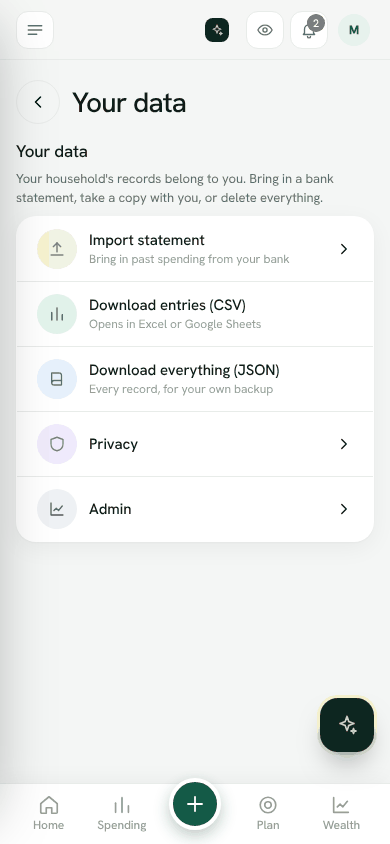
Download everything (JSON)
Tap Download everything (JSON) for every record in the household, for your own backup.
Bring data in
On the same screen, Import statement brings in past spending from your bank. See Import a bank statement.
Open Your dataWas this helpful?
Still stuck? Write to us from Help in the app. Open Bosla · Updated 24 October 2026
Keep reading
- How Safe to spend worksSafe to spend is what is in your spending accounts, minus bills due before payday and what still has to go to your goals.
- Split your salary on paydayWhen your salary arrives, split it between bills, goals and spending in one step.
- Goals and your safety netSave for what matters, starting with money for the unexpected.
- Set and keep a budgetGive a category a limit for each pay cycle and Bosla warns you before you go over.