Import a bank statement
Bring in past spending from a CSV statement file; Bosla skips anything already added and guesses categories.
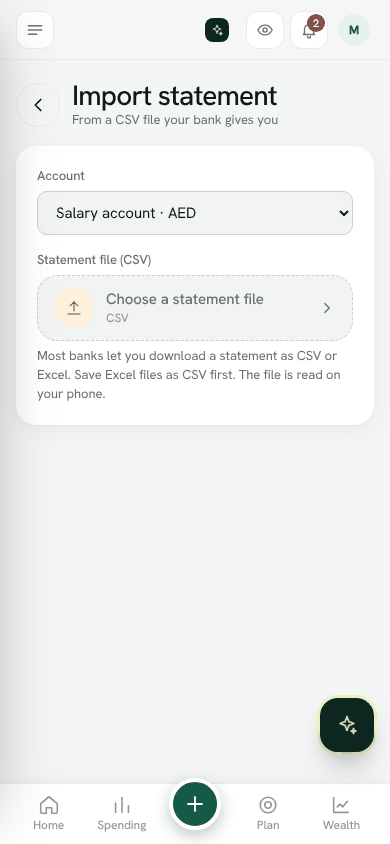
Most banks let you download a statement as CSV or Excel. Import it to bring past spending into Bosla. The file is read on your phone.
Before you start
- Add the account on Home first.
- If your bank gives you an Excel file, save it as CSV first.
- The file must be under 5 MB. For a bigger file, download a shorter date range.
- Owners, spouses and adults can import.
Import the statement
- 1Open Import a statement from the menu (under Tools), or Settings → Your data.
- 2Choose the Account it belongs to.
- 3Tap Choose a statement file.
- 4Under Which column is which, match Date, Description, and either Amount (one column, minus for money out) or Money out and Money in.
- 5Under Dates are written, choose Day first (31/12/2026) or Month first (12/31/2026).
- 6Leave Keep today's balance as it is on for past statements, because your balance already includes them. Turn it off if the balance should change by everything imported.
- 7Check the preview, then tap Add entries.
After importing
Entries already in Bosla are skipped. Categories are guessed from the description, so look through Spending and change any that are wrong.
If the connection drops part way, choose the file again. Rows already added are skipped.
Import a statementWas this helpful?
Still stuck? Write to us from Help in the app. Open Bosla · Updated 24 October 2026
Keep reading
- Ask Bosla: questions about your own moneyAsk about your spending, bills and goals in English or Arabic, and choose exactly what Bosla shares to answer.
- Scan a receipt, even a long oneTake a photo and Bosla reads the shop, each item and the total; long receipts can go in up to 6 photos.
- Price history, price check and your basketSee what you paid for each item and where it was cheaper, then check prices and your basket total while you shop.
- Forward your bank emails to BoslaForward your bank's alert emails to your household's Bosla address, and each purchase lands in To review.