Price history, price check and your basket
See what you paid for each item and where it was cheaper, then check prices and your basket total while you shop.
Every item from your receipts is remembered, with the price and the shop. Bosla uses that to tell you where things were cheaper.
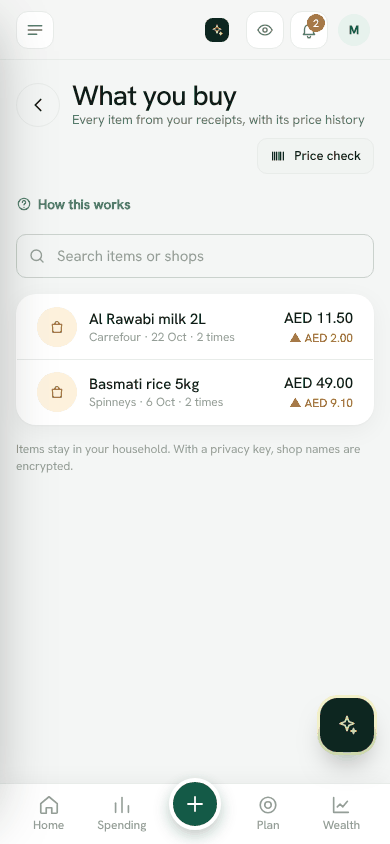
What you buy (price history)
Open What you buy from the menu. Each item shows how many times you bought it and the cheapest price, for example Cheapest: 7.50 at Lulu on 3 Oct. Use Search items or shops to find one.
Prices come from three places: Receipt, Shopping list and Price check.
Price check in the shop
- 1Open Price check from the menu.
- 2Under Which shop are you in?, type the shop, for example Lulu Bawshar.
- 3Find the item in one of three ways: Snap the price tag, Scan a barcode, or Or type the barcode number and tap Look up.
- 4Check the Item and the Price on the shelf.
- 5Bosla shows what you paid last time, and how much more or less it is today.
- 6Tap Add to basket, or Save price only.
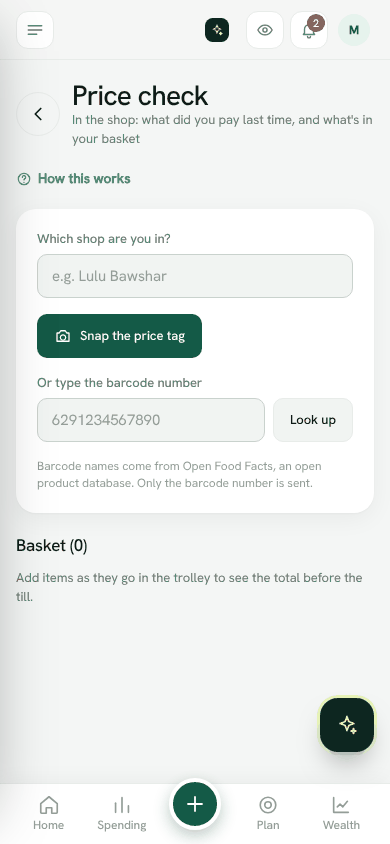
Your basket
As items go in the trolley, the Basket total adds up before you reach the till. If you have a groceries budget, Bosla shows what will be left after this, or how much it would go over.
When you have paid, tap Save as spending. If you paid a different amount at the till, tap Scan the receipt instead; the receipt is the exact record.
The shared shopping list
The Shopping list is shared with your family. Anyone can add what is needed. Tick items off with what you paid, and Bosla shows the last price and where it was cheaper.
Items stay in your household. With a privacy key, shop names are encrypted.
Open Price checkStill stuck? Write to us from Help in the app. Open Bosla · Updated 24 October 2026
Keep reading
- Ask Bosla: questions about your own moneyAsk about your spending, bills and goals in English or Arabic, and choose exactly what Bosla shares to answer.
- Scan a receipt, even a long oneTake a photo and Bosla reads the shop, each item and the total; long receipts can go in up to 6 photos.
- Forward your bank emails to BoslaForward your bank's alert emails to your household's Bosla address, and each purchase lands in To review.
- Autopilot: what Bosla AI does for youOne page for everything Bosla adds for you, and what you have left this month.