Forward your bank emails to Bosla
Forward your bank's alert emails to your household's Bosla address, and each purchase lands in To review.
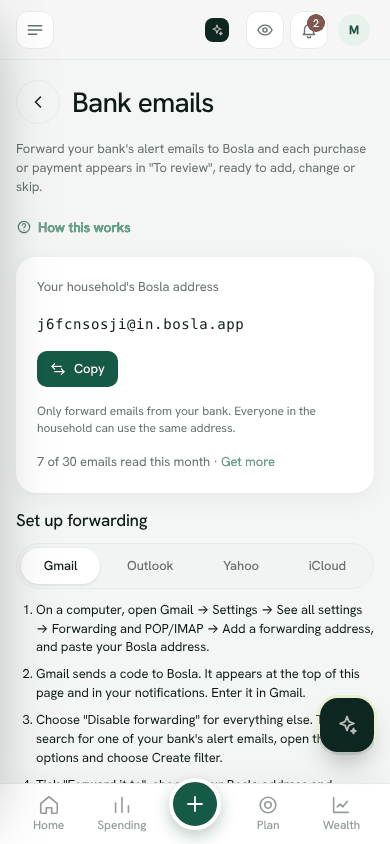
Most banks email you when you pay. Forward those alerts to Bosla and each purchase or payment appears in To review, ready to add, change or skip.
Get your Bosla address
- 1Open Settings → Bank emails.
- 2Under Your household's Bosla address, tap Copy.
Everyone in the household can use the same address. Only forward emails from your bank. If you cannot see an address, ask the household owner to set this up.
Set up forwarding
Under Set up forwarding, choose your email: Gmail, Outlook, Yahoo or iCloud.
Gmail
- 1On a computer, open Gmail → Settings → See all settings → Forwarding and POP/IMAP → Add a forwarding address, and paste your Bosla address.
- 2Gmail sends a code to Bosla. It appears at the top of Settings → Bank emails and in your notifications, under Gmail confirmation code. Enter it in Gmail, or tap Open Gmail's confirmation link.
- 3Choose Disable forwarding for everything else. Then search for one of your bank's alert emails, open the search options and choose Create filter.
- 4Tick Forward it to, choose your Bosla address and Create filter. Only bank alerts are forwarded.
Outlook
- 1Open Outlook → Settings → Mail → Rules → Add new rule.
- 2Condition: From, and type your bank's alert address.
- 3Action: Forward to, and paste your Bosla address. Save.
Yahoo
- 1Open Yahoo Mail → Settings → More settings → Filters → Add new filters.
- 2Set From to your bank's alert address, and forward to your Bosla address. Yahoo may ask you to verify the address.
iCloud
- 1On icloud.com, open Mail → Settings → Rules → Add a rule.
- 2If a message is from your bank's alert address, forward it to your Bosla address.
Add a shop without asking
When you add an entry from a bank email, Bosla may ask whether to add that shop automatically from now on. Choose Yes, add automatically to skip the check next time. You can see and switch these off under Shops you've approved in Settings → Bank emails. Only alerts from banks Bosla recognises are added automatically.
What Bosla keeps
Bosla reads each email once, keeps only the amount, date, shop and last 4 digits, and deletes the email. With a privacy key, the shop name is locked so only your family's phones can read it. Bank emails are never used to train AI.
How many emails
The Free plan includes 30 bank emails a month; paid plans include more. The count shows on Settings → Bank emails.
Open Bank emailsStill stuck? Write to us from Help in the app. Open Bosla · Updated 24 October 2026
Keep reading
- Ask Bosla: questions about your own moneyAsk about your spending, bills and goals in English or Arabic, and choose exactly what Bosla shares to answer.
- Scan a receipt, even a long oneTake a photo and Bosla reads the shop, each item and the total; long receipts can go in up to 6 photos.
- Price history, price check and your basketSee what you paid for each item and where it was cheaper, then check prices and your basket total while you shop.
- Autopilot: what Bosla AI does for youOne page for everything Bosla adds for you, and what you have left this month.