Ask Bosla: questions about your own money
Ask about your spending, bills and goals in English or Arabic, and choose exactly what Bosla shares to answer.
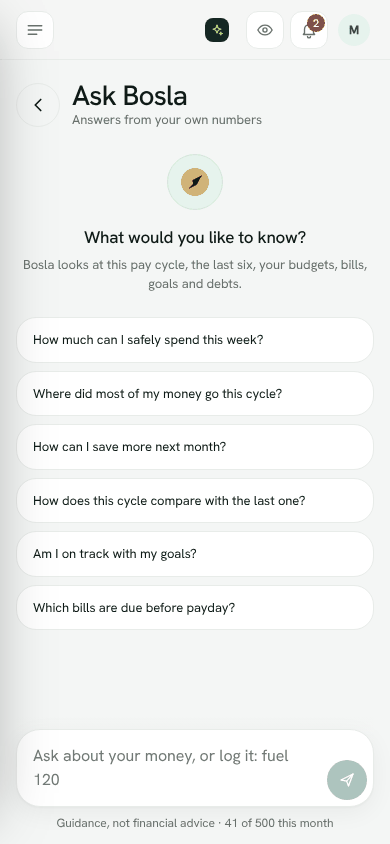
Ask Bosla answers questions from your own numbers. It looks at this pay cycle, the last six, and your budgets, bills, goals and debts.
Open Ask Bosla
- Tap Ask Bosla or search… at the top of the screen. On a computer you can also press Ctrl K.
- On a phone, tap the round Bosla AI button.
Try questions like How much can I safely spend this week?, Where did most of my money go this cycle? or Which bills are due before payday?
Choose what is shared
The first time you ask, Bosla shows Before you ask. To answer, Bosla sends a short summary of your numbers with each question. You choose:
- Totals and shop names: better answers about where your money goes.
- Totals only: shop names stay on your phone.
Then tap Agree and ask.
What is sent: totals for money in and out, categories, budgets, bills, goals and debts. What is never sent: account numbers, card numbers, notes or receipt photos.
Your chat stays on this phone. Bosla stores neither the questions nor the answers, and they are not used to train AI.
Change or stop sharing
Under the question box, tap Sharing totals and shop names (or Sharing totals only) to change your choice. To switch it off, choose Stop using Ask Bosla.
How many questions you have
Questions are part of your plan's monthly allowance. The count shows under the box, and Plan and usage shows what is left. Allowances start again on the 1st of each month. Ask Bosla is for grown-ups in the household; children cannot use it.
Answers are guidance, not financial advice.
Open Ask BoslaStill stuck? Write to us from Help in the app. Open Bosla · Updated 24 October 2026
Keep reading
- Scan a receipt, even a long oneTake a photo and Bosla reads the shop, each item and the total; long receipts can go in up to 6 photos.
- Price history, price check and your basketSee what you paid for each item and where it was cheaper, then check prices and your basket total while you shop.
- Forward your bank emails to BoslaForward your bank's alert emails to your household's Bosla address, and each purchase lands in To review.
- Autopilot: what Bosla AI does for youOne page for everything Bosla adds for you, and what you have left this month.