Scan a receipt, even a long one
Take a photo and Bosla reads the shop, each item and the total; long receipts can go in up to 6 photos.
Photo in, entry out. Bosla AI reads the shop, the items and the total. You check everything before it is saved, and the items go into your price history.
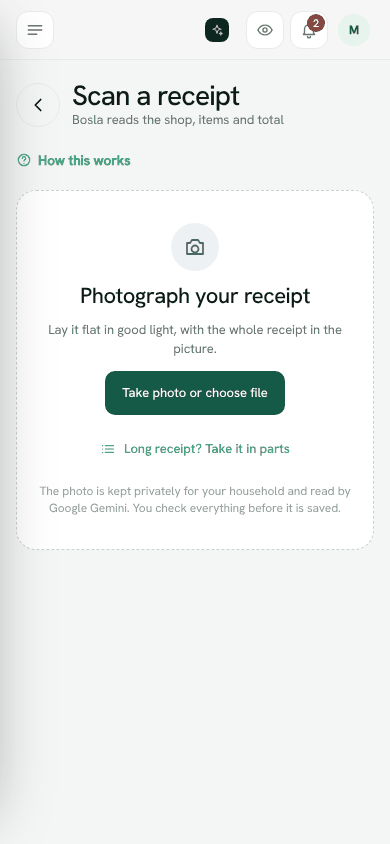
Scan a receipt
- 1Tap Scan on Home, or open Scan receipt in the menu.
- 2Tap Take photo or choose file. On a computer you can also drag a receipt photo or PDF onto the page.
- 3Lay the receipt flat in good light, with the whole receipt in the picture.
- 4Wait a few seconds while Bosla reads it.
- 5Check the shop, date, total and account. Fix anything that is wrong.
- 6Tap Save. Nothing is saved until you do.
A long receipt, in parts
- 1On the scan screen, tap Long receipt? Take it in parts.
- 2Tap Top of the receipt and take the first photo.
- 3Tap Next part for each part, from the top down. You can take up to 6 photos.
- 4Let each photo overlap the last one a little. Bosla will not count a line twice.
- 5Tap Read receipt to read all the photos together.
Items and categories
Each item is listed with its price. You can change an item, tap Remove item, or Add item.
If the items belong to different kinds of spending, switch on Split by item category. Groceries, household and personal care then become separate entries, so each budget counts the right part. Bosla turns this on for you when it sees more than one category. VAT, rounding and discounts go to the biggest part.
If the items add up to a little more or less than the total, that is fine when there was a discount or a fee.
When it does not read
- That does not look like a receipt, or it is too blurry to read. Try another photo closer up, in better light.
- This exact photo was saved before. Check you are not adding the same receipt twice.
- You can always tap Type it in instead.
Allowance and privacy
Receipt scans are part of your plan's monthly allowance; see Plan and usage. The photo is kept privately for your household. Receipts are never used to train AI. With a privacy key, receipt photos are locked on your phone before they are saved.
Scan a receiptStill stuck? Write to us from Help in the app. Open Bosla · Updated 24 October 2026
Keep reading
- Ask Bosla: questions about your own moneyAsk about your spending, bills and goals in English or Arabic, and choose exactly what Bosla shares to answer.
- Price history, price check and your basketSee what you paid for each item and where it was cheaper, then check prices and your basket total while you shop.
- Forward your bank emails to BoslaForward your bank's alert emails to your household's Bosla address, and each purchase lands in To review.
- Autopilot: what Bosla AI does for youOne page for everything Bosla adds for you, and what you have left this month.