Split your salary on payday
When your salary arrives, split it between bills, goals and spending in one step.
Planned saving happens; leftover saving rarely does. On payday, Bosla helps you give every part of your salary a job.
Open the split
- Save an Income entry with the category Salary. Bosla opens Split your salary straight away.
- Or tap the Salary arrived notification, or Split salary in Insights.
- If there is no salary entry yet this pay cycle, type the amount to plan with it.
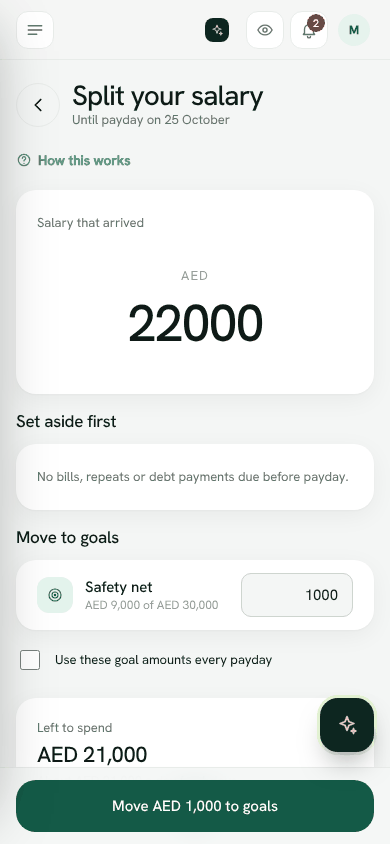
How the split works
- 1Salary that arrived shows the amount.
- 2Set aside first lists what is due before payday: Bills before payday, Repeating entries and Debt payments.
- 3Under Move to goals, enter how much goes to each goal. Each goal shows how far along it is.
- 4Tick Use these goal amounts every payday to keep them for next time.
- 5Left to spend shows what remains, and about how much that is per day.
- 6Tap Move ... to goals, or Done if you have no goals.
If the plan needs more than this salary, Bosla shows Short by. Lower a goal for this cycle, or check the bills.
Split your salaryWas this helpful?
Still stuck? Write to us from Help in the app. Open Bosla · Updated 24 October 2026
Keep reading
- How Safe to spend worksSafe to spend is what is in your spending accounts, minus bills due before payday and what still has to go to your goals.
- Goals and your safety netSave for what matters, starting with money for the unexpected.
- Set and keep a budgetGive a category a limit for each pay cycle and Bosla warns you before you go over.
- Bills and repeating entriesNever be surprised by rent, school fees or a subscription again.