To review and Autopilot
Entries from bank emails, bank texts and repeats wait in To review; Autopilot shows where your entries come from.
Bosla AI can fill in your spending for you. Nothing from an email or text is added without you seeing it first, unless you ask for that shop to be added automatically.
To review
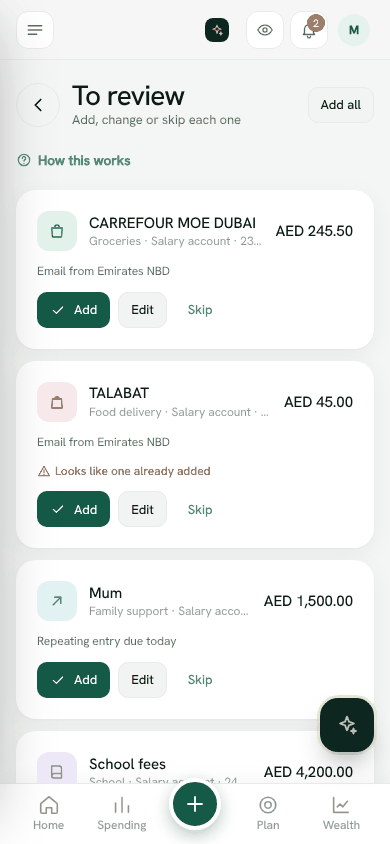
To review collects entries that are ready for you to confirm:
- From a bank email or From a bank text.
- Repeating entry due today, for repeats set to Ask me first.
For each one, tap Add, Edit or Skip. Edit lets you change the amount, category, account or date, then Add this entry. Use Add all to add everything at once.
Bosla flags anything that Looks like one already added, and tells you when an email is in another currency so you can check the amount and account.
Autopilot
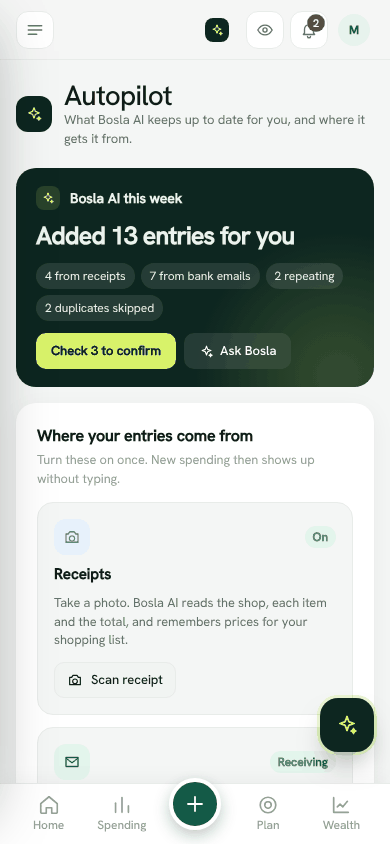
Open Autopilot from the Bosla AI section of the menu. It shows:
- Where your entries come from: Receipts, Bank emails and Repeating entries, and whether each is on. Tap Set up forwarding to connect bank emails.
- How many entries are waiting, with a link to See what is waiting.
- Added by Bosla AI: the latest entries it read or suggested, each with a small AI mark. Open Spending to change any of them.
- This month: how much of your plan's Bosla AI allowance you have used.
Your data and Bosla AI
- Receipts and emails are not used to train AI.
- Shop names can be locked so only your family's phones can read them.
- You can use your own AI key, or turn Ask Bosla off.
Still stuck? Write to us from Help in the app. Open Bosla · Updated 24 October 2026
Keep reading
- Ask Bosla: questions about your own moneyAsk about your spending, bills and goals in English or Arabic, and choose exactly what Bosla shares to answer.
- Scan a receipt, even a long oneTake a photo and Bosla reads the shop, each item and the total; long receipts can go in up to 6 photos.
- Price history, price check and your basketSee what you paid for each item and where it was cheaper, then check prices and your basket total while you shop.
- Forward your bank emails to BoslaForward your bank's alert emails to your household's Bosla address, and each purchase lands in To review.