Calculators: loans, savings targets and a safety net
Work out what a loan really costs, how long a savings target will take, and how big your safety net should be.
Open Calculators from the Tools section of the menu. The figures are rough, for planning. Your bank's documents show the exact cost.
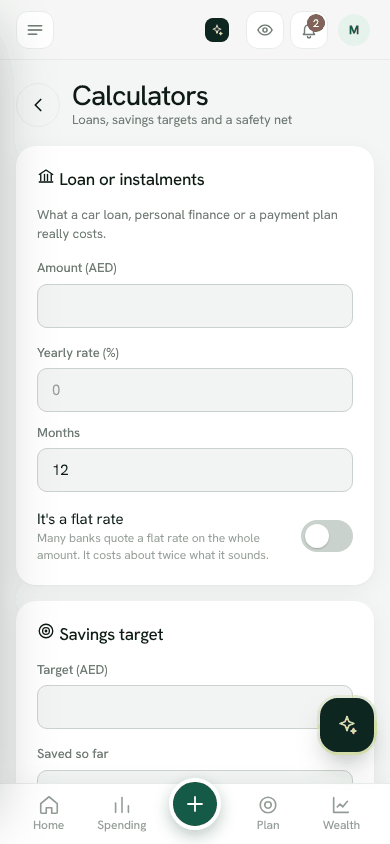
Loan or instalments
See what a car loan, personal finance or payment plan really costs.
- 1Enter the Amount, the Yearly rate (%) and the number of Months.
- 2If the bank quotes a flat rate, switch on It's a flat rate.
- 3Bosla shows what you pay Each month, the Total paid and the Cost of borrowing.
Savings target
- 1Enter the Target, what you have Saved so far and what you can put in Each month.
- 2Bosla shows how many months it will take, and around when.
- 3Or enter how many months you want, and Bosla shows how much to save each month.
Safety net
- 1Enter your Essentials each month.
- 2Choose How many months you want covered.
- 3Bosla shows the amount to aim for.
More planning
Planning in the same menu section covers retirement, what-ifs (like losing income for a while or a new baby) and, for those who plan to move home, your money on moving day.
Open CalculatorsWas this helpful?
Still stuck? Write to us from Help in the app. Open Bosla · Updated 24 October 2026
Keep reading
- How Safe to spend worksSafe to spend is what is in your spending accounts, minus bills due before payday and what still has to go to your goals.
- Split your salary on paydayWhen your salary arrives, split it between bills, goals and spending in one step.
- Goals and your safety netSave for what matters, starting with money for the unexpected.
- Set and keep a budgetGive a category a limit for each pay cycle and Bosla warns you before you go over.