Bills, Commitments and the Calendar
Add your regular bills and loans once, then see everything you have promised to pay, and when, in one place.
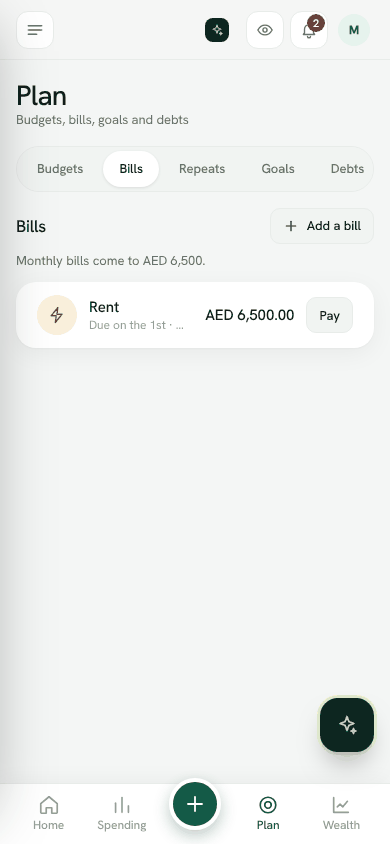
Rent, electricity, school fees, phone. Add them once and Bosla keeps their amount aside when working out Safe to spend.
Add a bill
- 1Open Plan and choose Bills, then tap Add a bill.
- 2Fill in What is it, the Amount, Due on day and How often: Weekly, Monthly, Every 3 months or Yearly.
- 3Paid to is optional. Tap Save.
Pay a bill
When a bill is due, tap Pay next to it. Choose the account, and Bosla records the amount as spent and marks the bill paid. If you already recorded the payment another way, choose Mark as paid.
Bosla reminds you 3 days before and on the day, if Bills due is on in Settings → Notifications.
Repeating entries
Use Plan → Repeats for money that goes out or comes in on a schedule, like rent, school fees, money you send home or monthly investing. Choose what happens on the day:
- Ask me first: it waits in To review so you can add, change or skip it.
- Add it automatically: Bosla adds the entry and updates the balance.
Commitments
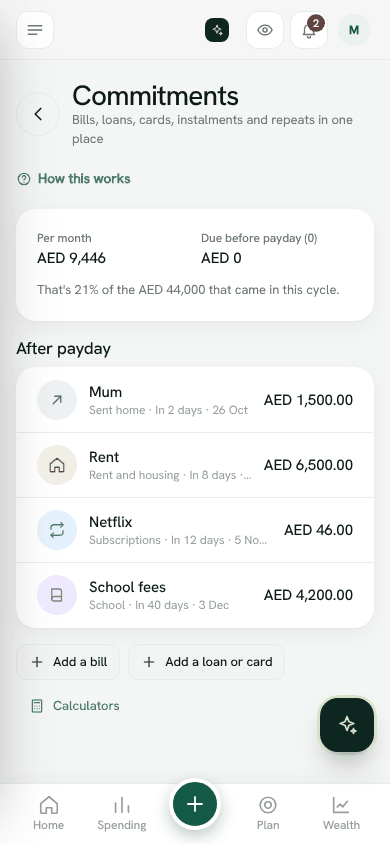
Commitments shows bills, loans, cards, instalments and repeats in one place: the total Per month, what is Due before payday, what comes After payday, and what is Still owed on debts. It also shows that total as a share of the money that came in this cycle. Use Add a bill or Add a loan or card to fill in what is missing.
Calendar
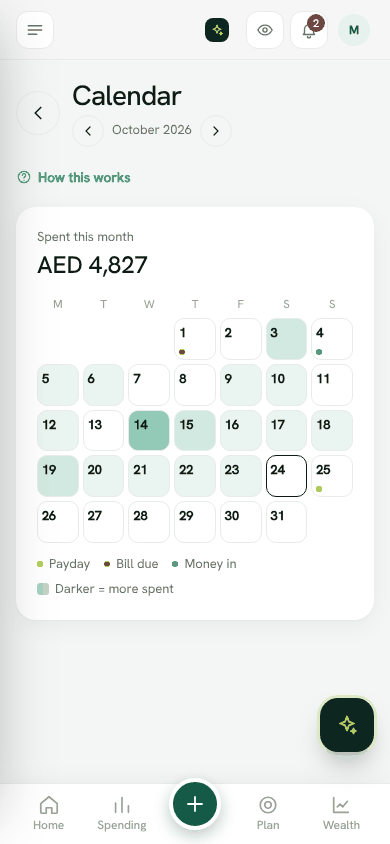
The Calendar shows a month at a glance. Days are marked for Payday, Bill due and Money in, and darker days mean more was spent. Tap a day to see what happened, or what is due. Use the arrows to move between months.
Still stuck? Write to us from Help in the app. Open Bosla · Updated 24 October 2026
Keep reading
- How Safe to spend worksSafe to spend is what is in your spending accounts, minus bills due before payday and what still has to go to your goals.
- Split your salary on paydayWhen your salary arrives, split it between bills, goals and spending in one step.
- Goals and your safety netSave for what matters, starting with money for the unexpected.
- Set and keep a budgetGive a category a limit for each pay cycle and Bosla warns you before you go over.