Set up your payday and accounts
Tell Bosla when you are paid and add the accounts you spend from, so Safe to spend is right from day one.
Bosla plans everything around your payday. Two things make the numbers right: when you are paid, and how much is in the accounts you spend from.
When you sign up
- 1Choose who Bosla is for: Just me, Me and my family, or My family and my business.
- 2Add your first name and choose Where you live: UAE, Oman or Nigeria. This sets your household's currency.
- 3Under When do you get paid?, choose the Day of the month. If you are paid another way, tap Other ways and choose Last day of the month, Weekly, Every two weeks or It varies.
- 4If you are paid weekly or every two weeks, Bosla asks When were you last paid? so it can count the days.
Change your payday later
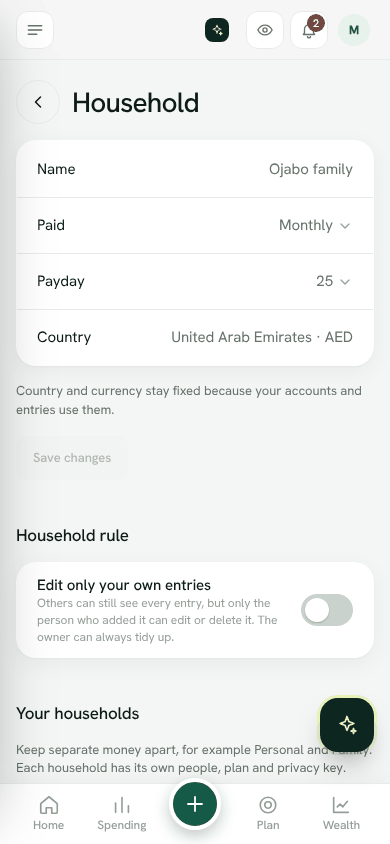
- 1Open Settings → Household.
- 2Change Paid, Payday or Last payday.
- 3Tap Save changes.
Only the owner or spouse can change these. Country and currency stay fixed, because your accounts and entries use them.
Add your accounts
- 1On Home, tap Add account.
- 2Give it a name, for example Salary account.
- 3Choose the Type: Current account (spending), Savings (kept apart), Cash, Credit card, Investment or Other.
- 4Enter the Balance today. The bank and last 4 digits are optional.
- 5Save.
Current accounts and cash count towards Safe to spend. Savings are kept apart, so money you are saving is not counted as spending money.
Hide or delete an account
Open the account and choose Hide this account if you no longer use it. An account that has entries cannot be deleted, so hiding keeps your history.
The Get set up list
Home shows a short Get set up list: add your name, mark the account you spend from, record your income, add your regular bills, set one budget and start a safety net. Tick them off at your own pace, or tap Hide.
Open household settingsStill stuck? Write to us from Help in the app. Open Bosla · Updated 24 October 2026
Keep reading
- Start here: your first ten minutesSet up your household, add your accounts and see your safe-to-spend number.
- What is Bosla?Bosla helps your household see what is safe to spend until payday, after bills and savings.
- Adding spending and incomeThree ways to keep your numbers up to date, from fastest to most automatic.
- Add an entry, or just type "fuel 120"Record spending and income in seconds, with quick typing and one-tap chips for what you usually buy.