Invite family and choose their role
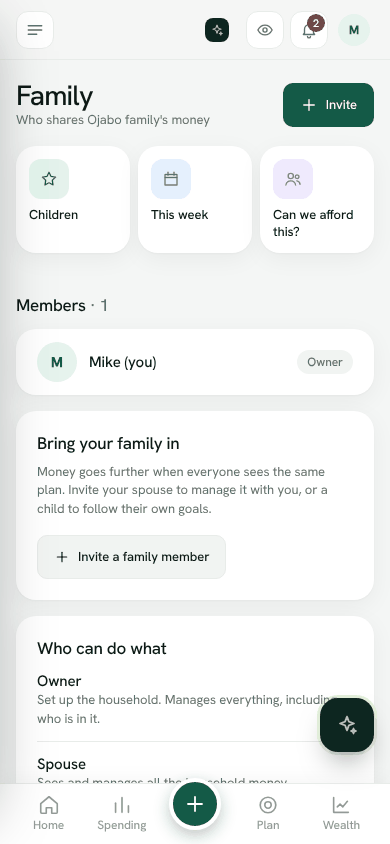
Bring your spouse and family into the household, each with a role that sets what they can see and do.
Money goes further when everyone sees the same plan. Invite your spouse to manage it with you, or a child to follow their own goals.
Invite someone
- 1Open Family and tap Invite.
- 2Enter Their email.
- 3Under What they can do, choose a role.
- 4Tap Create invite link.
- 5Tap Copy link or Share and send it to them.
The link works once, for that email only. If they sign in with a different email, Bosla asks them to sign in with the email the invite was sent to.
Only the household owner can invite people. Invites waiting to be accepted show under Waiting to join, where you can copy the link again or Cancel it.
Roles
- Owner: set up the household. Manages everything, including who is in it.
- Spouse: sees and manages all the household money.
- Adult: adds entries and manages budgets and goals.
- Child: sees only their own goals.
- Viewer: can look, cannot change anything.
To change a role, tap the person and choose another. To remove someone, choose Remove from household. They will no longer see the household; their past entries stay.
Who edits what
In Settings → Household, the owner can switch on Edit only your own entries. Everyone can still see every entry, but only the person who added it can edit or delete it. The owner can always tidy up.
Family features
- This week: a weekly family summary of spending, bills coming up, goals and chores.
- Can we afford this?: ask the family about a bigger buy, see what it does to Safe to spend, and let each grown-up answer.
Sharing a household with family is part of the Family plan, which has room for up to 6 people.
Open FamilyStill stuck? Write to us from Help in the app. Open Bosla · Updated 24 October 2026
Keep reading
- Bring your family inInvite your partner and family, and choose what each person can do.
- Children's moneyPocket money, jars for spending and saving, and chores that earn.
- Children: allowance, jars and choresGive each child three jars (spend, save and give), an allowance, chores with rewards and short money lessons.
- The shopping assistantA shared list that remembers what you paid and where it was cheaper.