Wealth, zakat and sending money home
Track investments and net worth, work out zakat, and see what your transfers home really cost.
Wealth: everything you own in one place
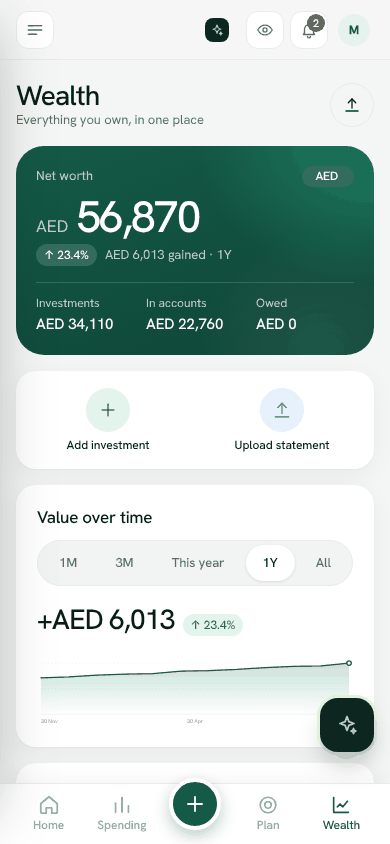
Open Wealth to see your Net worth: investments plus money in accounts, minus what you owe, at today's exchange rates.
- 1Tap Add investment, or Upload statement to have Bosla AI read a statement from your investment company (PDF, photo or CSV, up to 10 MB). You check what was read before saving.
- 2Choose the type, for example a money market fund, shares, a pension, gold or property.
- 3Each month, tap Update value so you can see your wealth grow.
You can see where your money is by platform, type, currency or person, set a target mix, and turn on the Islamic finance view to show Shariah marks. For gold, Bosla can use today's price for the weight and purity you hold.
Zakat
Zakat works out what is due this year from your net worth: 2.5% of wealth held for a year above the nisab. Choose whether the nisab is based on gold (85 g) or silver (595 g), and save your zakat date. It is a guide only; rules differ between schools, so ask a scholar you trust about your situation.
Estate view
The Estate view lists what you own so your family can find it, with a nominee and a vault note for each investment. It is not a will.
Sending money home
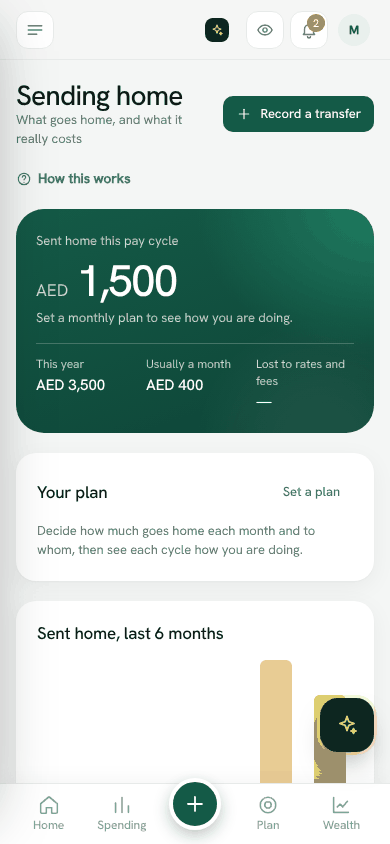
Open Sending home to plan and track what goes home.
- 1Tap Set a plan: how much goes home each month, to whom, and the currency they receive.
- 2Before you send, use Compare before you send. Type each provider's fee and rate, and Bosla shows who gives your family the most against today's mid-market rate.
- 3After you send, tap Record a transfer and add what your family received. Bosla then shows what the transfer really cost, fees included.
You can also Make it a repeating entry. Bosla does not send money or take a commission. Rates change through the day, so check the final amount before you pay.
Still stuck? Write to us from Help in the app. Open Bosla · Updated 24 October 2026